


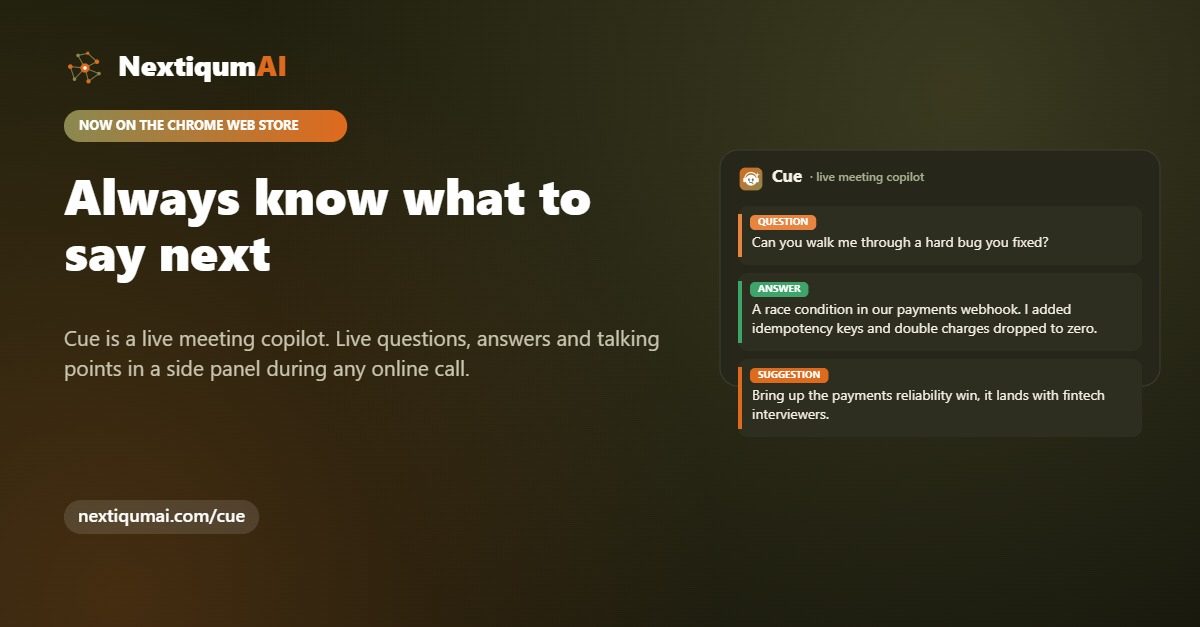
Everyone knows the feeling. The interviewer asks the one question you did not prepare for, a prospect raises an objection you have heard a hundred times, or your manager turns to you in a standup and your mind goes blank. The answer usually arrives ten minutes after the call ends, which is exactly ten minutes too late.
Freezing in meetings is not a sign that you are unprepared or bad at your job. It is a normal response to pressure, and the good news is that it is very fixable. Here is why it happens and what actually helps in the moment.
Why we freeze
Live conversation asks your brain to do several hard things at once: listen, understand, recall the right fact, and phrase a clear answer, all while a room of people waits. Under stress your working memory narrows, so the fact or the phrasing you need is there but temporarily out of reach. The problem is almost never knowledge. It is retrieval under pressure.
What actually helps in the moment
Preparation helps, but you cannot rehearse every possible question. Notes help, but flipping through a document mid sentence is slow and obvious. What works best is a small, quiet prompt at the exact second you need it: the question restated clearly, a clean answer you can say out loud, and a reminder of the point you wanted to make. That is the gap we built Loquelle to fill.
Meet Loquelle, a live meeting copilot
Loquelle listens to your online call and shows questions, suggested answers and talking points in a tidy side panel, in real time. When someone asks something tricky, the question appears in plain words with a ready answer underneath, so you always have the next line. There is no screen share popup for the people you are talking to, and your audio is never stored on our servers. It is processed live and then it is gone.
How to set it up
Loquelle is a Chrome extension, now live on the Chrome Web Store. Add it to Chrome, sign in with a free NextiqumAI account, and open the side panel before your next call. Free accounts include a daily allowance of live minutes, with more on the Pro and Business plans, and it runs on the same account that powers our six free AI agents. Loquelle is in Beta, and we are shaping it with real feedback right now.
Where it helps most
People reach for Loquelle in the moments that carry the most weight: job interviews, sales and discovery calls, client meetings, and fast standups where you have to answer on the spot. It is not about reading from a script. It is about having a calm safety net so you can stay present and let the right words come.
The next time someone asks the question you did not see coming, you do not have to freeze. Add Loquelle to Chrome, or see how it works at nextiqumai.com/loquelle.
What can you do the next time your mind goes blank on a call?
Freezing is a retrieval problem, not a knowledge problem, so the fixes are about getting the right line back within reach.
- Prepare, but accept the limit. Rehearsal helps, and you still cannot cover every question that comes up.
- Do not flip through notes mid sentence. Searching a document while a room waits is slow and obvious.
- Keep a quiet prompt within sight. That means the question restated clearly, a clean answer you can say out loud, and a reminder of the point you wanted to make.
- Set up Loquelle before the call. Add the Chrome extension, sign in with a free NextiqumAI account, and open the side panel before you join.
- Use it as a safety net, not a script. The aim is to stay present and let the right words come, in interviews, sales and discovery calls, client meetings and standups.
Your audio is processed live and never stored on our servers, and the people you are talking to see no screen share popup.
What does a useful prompt look like in the moment?
Take the interview question many people dread: tell me about a time a project went wrong. Without help, the mind races through every project at once and settles on none. A useful prompt narrows that down. It restates the question in plain words, so you know exactly what is being asked. It offers a short answer you can say out loud: the situation, what you did, and what changed afterwards. And it reminds you of the point you wanted to make about yourself, so the story ends somewhere useful.
You do not read it word for word. You glance, pick up the thread, and speak in your own voice. The same pattern works for a sales objection or a question in a standup. The common mistake is treating the panel as something to recite from, which pulls your eyes and attention away from the person you are talking to. Glance, then look back up and answer.